“We need to do a major version upgrade. Debezium is streaming to Redshift. How do we avoid a full re-snapshot?”
This comes up whenever a team has a multi-terabyte MySQL database with a CDC pipeline hanging off it, and the worry is always the same one. Binlog coordinates reset when the database is upgraded, the offset Debezium has stored stops meaning anything, and you are looking at days of re-snapshotting while the data team stares at stale dashboards.
You do not need a re-snapshot. The awkward part is that the documentation does not explain how this behaves when Debezium reads from a replica rather than the writer, which is how most people run it. That is the gap I want to fill.
Table of Contents
Open Table of Contents
The setup
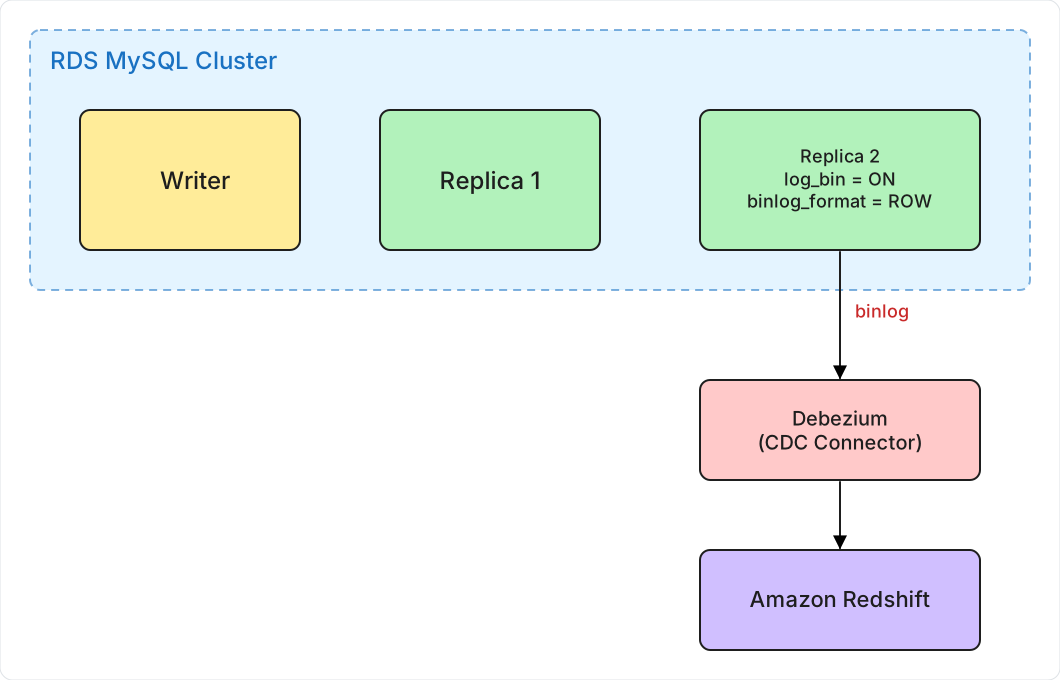
One writer and two replicas. One of those replicas is set up for CDC — log_bin = ON, binlog_format = ROW, binlog_row_image = FULL, all per Debezium’s docs — and Debezium connects to it. The connector tracks its position in the stream as a filename and an offset, something like mysql-bin-changelog.000042 at position 985632.
Two of those three are the usual suspects. binlog_row_image is the one worth knowing about, because RDS defaults it to FULL and so nobody learns it exists until someone drops it to MINIMAL to save network bandwidth. Then the connector’s before images contain nothing but the primary key, and your sink quietly writes nulls over columns that never changed.
There is an RDS-specific trap too: binlogs are only retained if automated backups are enabled, and retention length is set through mysql.rds_set_configuration('binlog retention hours', 48) rather than a parameter group. Left at NULL, RDS purges binlogs whenever it likes, which turns any connector outage longer than a few minutes into a re-snapshot.
If binary logging is off entirely, the connector will not even start. Debezium runs SHOW MASTER STATUS during its snapshot, gets an empty result, and throws Cannot read the binlog filename and position via 'SHOW MASTER STATUS'. On RDS, log_bin is managed by AWS and defaults to off, so this catches people out regularly.
One forward-looking note, since the whole point here is a major version upgrade: MySQL 8.4 renames that statement to SHOW BINARY LOG STATUS. RDS supports 8.4. If 8.4 is your upgrade target, confirm your Debezium version handles the rename before you book the window — upgrading the database and then discovering the connector cannot read the server’s binlog status is a bad afternoon.
After a major version upgrade, the coordinates the connector has stored do not exist on the new instance any more. That is the problem this post is about.
Why Blue/Green helps
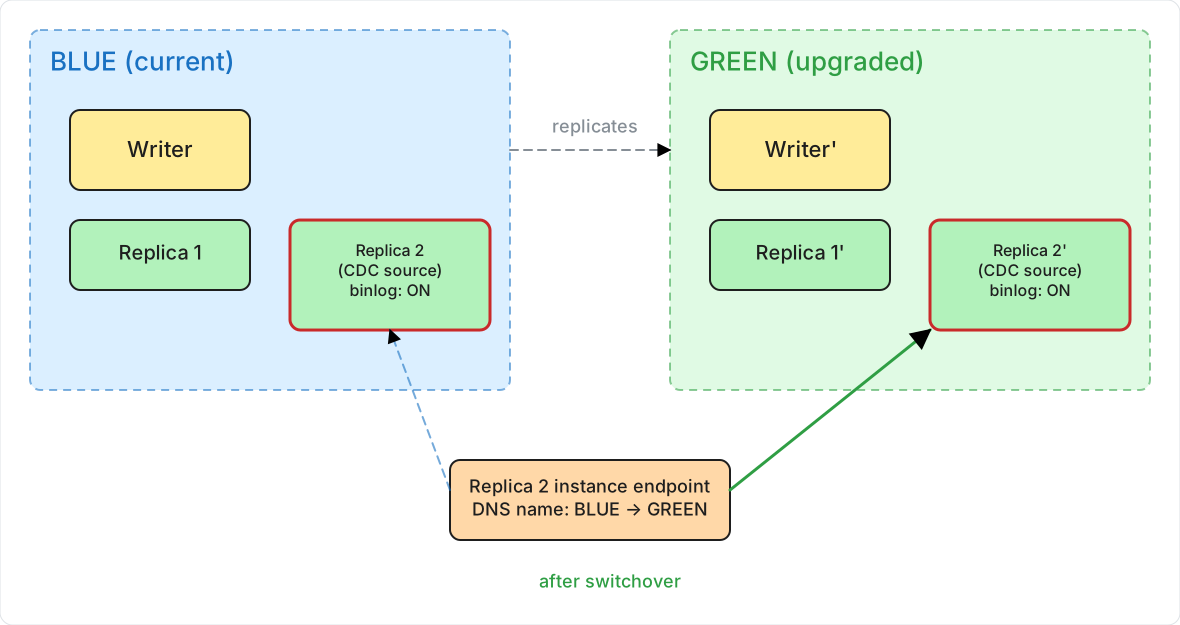
RDS Blue/Green Deployments copy your whole environment into a staging area, upgrade the copy, and then swap the endpoints over. Four things about that matter for a CDC pipeline.
The topology is copied in full, so the writer and every replica get recreated on the green side without you doing anything. Parameter settings come across too, which means log_bin = ON, binlog_format = ROW and binlog_row_image = FULL are still in place on the green replica. Endpoints move with the switchover — in AWS’s words, “RDS also renames the endpoints in the green environment to match the corresponding endpoints in the blue environment so that application changes aren’t required.” And the switchover itself takes seconds rather than hours.
Be precise about what that endpoint promise covers, though, because it is narrower than people assume. A standard RDS for MySQL read replica is its own DB instance with its own instance endpoint — there is no aggregate reader endpoint to point a connector at, Multi-AZ DB clusters being the exception that Blue/Green does not support anyway. What you get is the green replica inheriting the blue replica’s endpoint DNS name, which is enough provided your connector re-resolves that name. Hold that thought.
There is one catch, and it is the reason this post exists. Every instance in the green environment starts a fresh binlog sequence, so the file and position Debezium has stored no longer point at anything real.
Before fixing that, notice how much worse it is for the managed alternatives — this is the strongest argument for running your own connector. AWS says flatly that after switchover, “AWS Database Migration Service (AWS DMS) replication tasks can’t resume because the checkpoint from the blue environment is invalid in the green environment. You must recreate the DMS task with a new checkpoint.” And Blue/Green forbids Redshift zero-ETL outright: you must delete the integration before switching over and recreate it afterwards, which means reseeding your target tables.
Debezium is the option where the checkpoint belongs to you and can be edited. That is the entire reason this situation is recoverable.
Option A: binlog position recovery
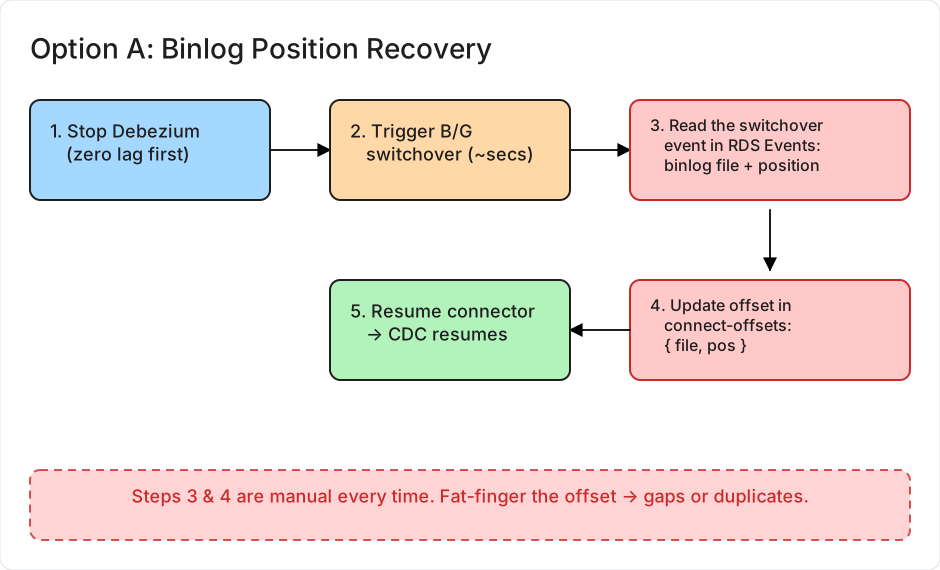
This works today and needs nothing set up in advance.
Before the switchover
- Check that Debezium has caught up and is showing zero lag.
- Stop the connector.
The switchover
- Trigger the Blue/Green switchover. RDS syncs the two environments and swaps the endpoints over, which takes seconds.
After the switchover
-
Read the new binlog coordinates from the switchover event.
AWS emits an event for exactly this purpose, documented under “Updating the parent node for consumers” on the switchover page. In the RDS console open Events, and filter by the name the green DB instance had before switchover. You are looking for:
Binary log coordinates in green environment after switchover: file mysql-bin-changelog.000003 and position 40134574Use that event, not the
Binlog position from crash recovery is ...line that also shows up under Logs & events. The crash-recovery line is the position at which the instance started, and a green instance started when you created the green environment — potentially days earlier. Resume from it and you replay every transaction green received during staging.Here is the wrinkle the AWS procedure does not cover, and it is the one that matters when CDC reads from a replica. AWS documents this event as coming from the green writer. A replica’s binlog is its own sequence with its own positions, so the writer’s coordinates are meaningless on it. Before you plan a window around this step, confirm your green replica emits its own coordinates event. If it does not, your options are to resume against the writer instead, or to use GTID (Option B), where the question never arises.
When you are torn between two candidate positions, take the earlier one. Duplicates are recoverable if your sink upserts on the primary key. A gap is not recoverable without a backfill you may struggle to even scope.
-
Write those coordinates into the connector’s stored offset.
This is the step most write-ups skip over, and it is the fiddly one. Kafka Connect keeps source offsets in an internal compacted topic, named by the
offset.storage.topicsetting and usually called something likeconnect-offsets. You do not edit it by hand.On Kafka Connect 3.6 or later there are REST endpoints for exactly this job. The connector has to be stopped first, which you already did in step 2:
# stop the connector (a paused connector is not enough)
curl -X PUT http://connect:8083/connectors/mysql-cdc/stop

# look at what it currently has stored
curl http://connect:8083/connectors/mysql-cdc/offsets

# write the new coordinates
curl -X PATCH -H "Content-Type: application/json" \
  http://connect:8083/connectors/mysql-cdc/offsets \
  -d '{
    "offsets": [
      {
        "partition": { "server": "my-topic-prefix" },
        "offset": { "file": "mysql-bin-changelog.000003", "pos": 40134574 }
      }
    ]
  }'
Use
GETfirst and copy the exact shape of thepartitionobject it returns. Getting that key wrong means yourPATCHwrites an offset the connector never reads, and it will quietly start from scratch instead.If you are running GTID (Option B) and only need to nudge a connector back into place, the same endpoint takes a
gtidsvalue instead of a file and position — a far safer thing to hand-edit, since there is no positional number to fat-finger:{ "offset": { "gtids": "3E11FA47-71CA-11E1-9E33-C80AA9429562:1-5234" } }On older versions of Connect there is no such endpoint, and you have to produce a record onto the offsets topic yourself with something like
kcat. If you are on MSK Connect, the REST API is not exposed to you at all, so check what your platform actually allows before you plan a maintenance window around these calls. -
Resume the connector with
PUT /connectors/mysql-cdc/resume.
What you get: a few minutes of CDC downtime, no re-snapshot, and a moderate amount of manual work.
What it costs you: you do this again on every upgrade, and a mistyped offset gives you either a gap in the data or a batch of duplicates.
Option B: GTID
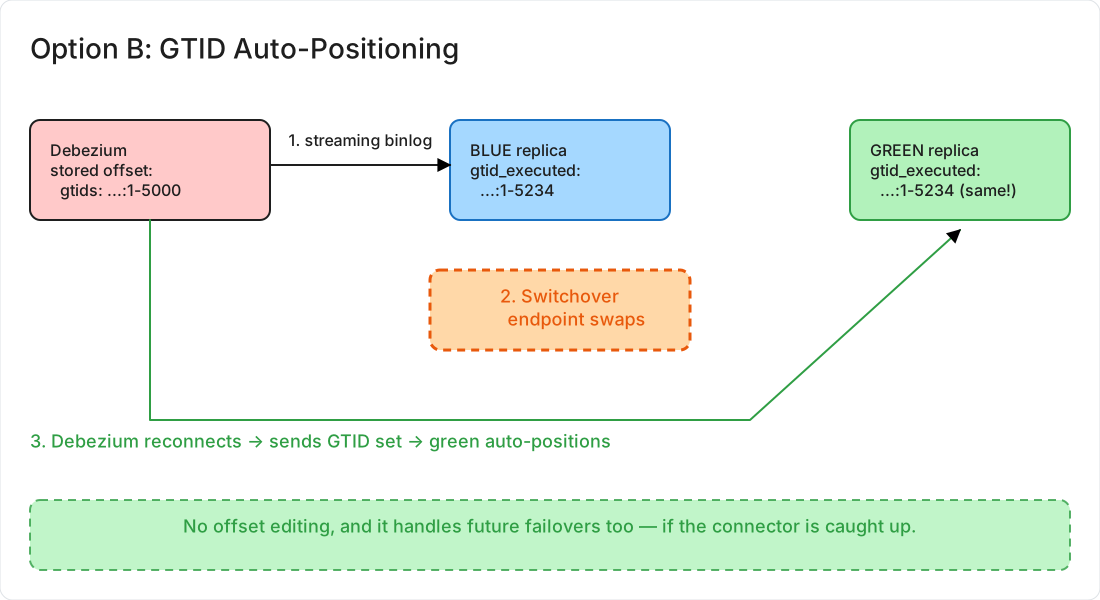
This one takes some setting up. Once it is done, upgrades, failovers, and topology changes stop being something Debezium notices.
How it works
When GTID is on, every transaction gets a globally unique identifier that has nothing to do with which binlog file it happens to sit in. Debezium stores the set of identifiers it has already seen:
{
  "ts_sec": 1711929600,
  "file": "mysql-bin.000123",
  "pos": 4567890,
  "gtids": "3E11FA47-71CA-11E1-9E33-C80AA9429562:1-5000",
  "snapshot": false
}
After the switchover the connector reconnects and asks for everything after GTID ...:1-5000. The server works out where that sits in its own binlog and carries on from there. Nobody has to look up a file name or a position.
Turning GTID on without downtime
MySQL documents the online enablement sequence and I am not going to retype it: you walk enforce_gtid_consistency from WARN to ON, then gtid_mode through OFF_PERMISSIVE and ON_PERMISSIVE, wait for anonymous transactions to drain, and finally set ON. Follow the MySQL manual’s version step by step, because the order genuinely is not negotiable. On RDS you drive it through the DB parameter group, where gtid_mode appears as gtid-mode.
Three things the MySQL manual cannot tell you, which is where the afternoon actually goes.
Your writer and its replicas almost certainly share one parameter group, so you cannot step them independently — each change lands on all of them at once. That satisfies MySQL’s requirement to finish each step everywhere before moving on, but it costs you the ability to stagger or to roll back one instance at a time. If you want that control, give the CDC replica its own parameter group first. And because RDS applies parameter changes asynchronously, “applied everywhere” is not something the console’s status field will tell you reliably — verify each step with SHOW GLOBAL VARIABLES LIKE 'gtid_mode'; against each instance individually.
The step that bites CDC pipelines is the waiting one near the end, and it is missing from most write-ups. Before you make the final move to ON, you have to stop needing any binlog that still holds pre-GTID transactions — because once gtid_mode is ON, those binlogs can no longer be used. If Debezium is still reading one when you flip it, the connector stops dead and your only way out is the re-snapshot you were trying to avoid. Confirm the connector has read past every anonymous transaction before that last step, not after.
There is nothing to switch on in the connector itself. Debezium picks up GTIDs automatically once the server reports gtid_mode = ON — its docs are explicit that GTIDs are “not required for a Debezium MySQL connector,” meaning they are a server-side property the connector adapts to rather than a feature you turn on. You will find advice out there to set "gtid.source.includes": ".*". Ignore it. That property is a filter over which source UUIDs to consider, its default is unset (meaning all of them), and .* is an elaborate way of writing the default.
The check that does matter: restart the connector and confirm its stored offset now contains a gtids field. If that field is missing, the connector is still tracking file and position, and none of this will help you.
Why it works on the green replica
Green replicates the full GTID history from blue while it is being staged, so gtid_executed on the green replica covers everything the connector has already seen, plus everything since.
What green does not have is binlog older than itself. Green’s binlog sequence begins when you created the green environment — the same reason AWS warns that after switchover, PITR’s “earliest restorable time starts when you created the green environment.” Everything before that point sits in green’s gtid_purged. Ask for a GTID in that range and MySQL refuses with error 1236: the source “has purged binary logs containing GTIDs that the replica requires.” The connector stops dead, and now you really do need a re-snapshot.
In practice this only bites you if the connector has been down a while, because the usable window is min(when green was created, your binlog retention hours). But it does mean Option B is not literally hands-off: the connector still has to be inside that window when you switch over. Check its lag before you press the button, exactly as you would for Option A.
What the switchover looks like
You trigger the switchover, the connector loses its connection, and the replica’s endpoint DNS name starts resolving to the green replica. The connector reconnects, sends its GTID set, and the green replica works out where to carry on from. CDC resumes without you editing anything.
“Resumes on its own” does assume the connector retries rather than giving up. Switchover drops every connection and refuses new ones for its duration, so the binlog client will fail — under both options, not just this one. If your retry budget is shorter than the switchover takes, the task lands in FAILED and someone restarts it by hand, which is not the same as automatic. Check errors.retry.timeout against the switchover timeout you configured, which defaults to 300 seconds and can be set as high as an hour.
The failure mode that passes every check
Everything above assumes the connector is talking to the green replica after switchover. There is a way for that to be false while every health check you own says the pipeline is fine.
AWS gives the warning, though not anywhere you would look for CDC advice: “Make sure that your network and client configurations don’t increase the DNS cache Time-To-Live (TTL) beyond five seconds, which is the default for RDS DNS zones. Otherwise, applications will continue to send write traffic to the blue environment after switchover.”
The JVM is the worst offender for this, and Kafka Connect is a JVM application. A worker that has already resolved the replica’s endpoint can hold onto that resolution well past the DNS TTL, depending on how networkaddress.cache.ttl is set. So the connector reconnects — to blue.
Now look at what blue actually is after switchover. It is not gone. AWS retains it, renamed with an -old1 suffix, and it stays up and read-only until you delete it. Its binlog is intact. It simply has no new transactions in it, because production writes are going to green.
So the connector reconnects successfully, reads to the end of blue’s binlog, reports RUNNING, and shows zero lag. Every item in the checklist below passes. Your gtid_executed comparison passes too, because you are comparing against the server the connector is actually reading. And no rows arrive, indefinitely, until someone notices the dashboards stopped moving.
Two things prevent it:
- Set
-Dsun.net.inetaddr.ttl=5(ornetworkaddress.cache.ttl=5injava.security) on the Connect workers, and make sure nothing upstream — a caching resolver, a service mesh — is holding the name longer. - Simpler and more reliable: restart the Connect workers as part of the switchover runbook. Under Option A you are already accepting a brief CDC outage; under Option B a worker bounce costs seconds.
Then verify against the source you expect, not the one you happen to be connected to. Because this is a major version upgrade, the version string is a perfect discriminator:
SELECT @@version, @@server_uuid;Run it against whatever the connector resolved. Green reports the new engine version; blue-turned--old1 still reports the old one. Do not reach for @@global.read_only here — your CDC source is a replica, so it reads 1 either way.
Which one to use
| Binlog file and position | GTID | |
|---|---|---|
| CDC downtime | Minutes | Seconds |
| Manual steps | Read the event log, then patch the offset | None, provided the connector is caught up |
| Re-snapshot | No | No |
| Works for the next upgrade too | No | Yes |
| Setup needed first | None | One-time enablement |
| Room for human error | You are typing a binlog offset by hand | Much smaller, though not zero |
GTID removes the manual offset editing, which is where most mistakes happen. It does not make the upgrade risk-free. Errant transactions on one instance, the pre-GTID binlog trap in step 6, and green’s gtid_purged floor are all still yours to manage — and neither option protects you from the DNS problem above.
If this is a one-off upgrade, use Option A. Ten minutes of careful work and you are done. If it is a production pipeline you would rather not be paged about at 3am, spend an afternoon on GTID and stop thinking about binlog positions altogether.
The five things people actually forget
Everything above is the reasoning. If you take only a screenshot from this post, take this — the items that are easy to skip and expensive to skip.
binlog retention hoursis not a parameter group setting. It is a stored procedure, it defaults toNULL, andNULLmeans RDS purges whenever it likes. Set it, then verify it again on the new production instance after switchover rather than assuming it came across.- Drain the connector to zero lag before you switch over. Both options need this, not just Option A. GTID does not save you if the position you need is below green’s
gtid_purged. - Deal with DNS before the switchover, not after. Either drop the Connect workers’ TTL to 5 seconds or put a worker restart in the runbook. This is the one failure that reports itself as healthy.
- Check the engine version, not the connector status.
SELECT @@versionagainst whatever the connector resolved is the only cheap way to prove you are reading green and not the retained blue instance. - Delete any Redshift zero-ETL integration first. Blue/Green refuses to switch over while one exists, and you will find out at the worst moment.
And one that is not a checkbox so much as a habit: write the connector’s current offset down somewhere outside Kafka before you start. It costs nothing and it is the only record you will have if the offsets topic surprises you.
Proving you did not lose anything
“Lag is back to zero” and “rows are arriving” tell you the pipeline is alive. Neither tells you whether a gap opened up while you were switching over, and that is the thing you actually care about. Two checks worth running.
Compare what the connector has consumed against what the server has produced. On the green replica, run SELECT @@global.gtid_executed; and compare it to the gtids value in the connector’s stored offset. The connector should be at or just behind the server, with no missing ranges in the middle.
Then count rows over the switchover window. Pick a table with a reliable modification timestamp and compare both sides across a window that covers the outage with room to spare:
-- on the MySQL source
SELECT COUNT(*), MAX(updated_at)
FROM   orders
WHERE  updated_at >= '2026-03-26 09:00:00'
AND    updated_at <  '2026-03-26 10:00:00';

-- the same window in Redshift
SELECT COUNT(*), MAX(updated_at)
FROM   orders
WHERE  updated_at >= '2026-03-26 09:00:00'
AND    updated_at <  '2026-03-26 10:00:00';
Matching counts across that window mean you came through clean. A short count on the target means you lost changes and need to backfill that window. Run this before you tell anyone the upgrade went fine.
Two limits on that check, so you do not over-trust it. It cannot see deletes at all — a row deleted on the source drops out of both counts if your sink applied the delete, and out of neither if it did not. And it leans on updated_at being maintained honestly; if that column is set by application code rather than by the database, any code path that forgets it produces a row your window never sees. For anything you would have to defend in a post-incident review, add a checksum over a stable key range on both sides, and reconcile deletes separately by comparing primary keys rather than counts.
One last thing to keep an eye on. The connector’s schema history topic survives the upgrade untouched, which is what you want, but a major version upgrade can change how the server reports types for some columns. Check the first few change events after the switchover against what your sink expects, rather than assuming the schema came through unchanged.
References
- Creating a blue/green deployment, Amazon RDS User Guide
- Switching a blue/green deployment, Amazon RDS User Guide — switchover actions, guardrails, and the DNS TTL warning
- Updating the parent node for consumers, Amazon RDS User Guide — the documented source of the post-switchover binlog coordinates, and the basis of Option A
- Limitations and considerations for blue/green deployments, Amazon RDS User Guide — the DMS checkpoint, the zero-ETL restriction, and the PITR reset
- Using GTID-based replication, Amazon RDS User Guide
- Enabling GTID-based replication for existing read replicas, Amazon RDS User Guide
- Enabling GTID Transactions Online, MySQL 8.0 Reference Manual
- GTID system variables, including
gtid_purged, MySQL 8.0 Reference Manual — what error 1236 is telling you - SHOW BINARY LOG STATUS, MySQL 8.4 Reference Manual — the renamed
SHOW MASTER STATUS - MySQL Connector, Debezium Documentation —
binlog_row_image, the RDS automated-backups requirement, andgtid.source.includes - Frequently Asked Questions, Debezium Documentation
- Kafka Connect REST API, Apache Kafka Documentation
- Binary log configuration, Amazon RDS User Guide —
mysql.rds_set_configuration